
1. Sissejuhatus
Tänan ostu eestasing the GooDee Mini Projector GD-DE-9. This manual provides essential information for setting up, operating, and maintaining your projector. Please read it thoroughly before use to ensure optimal performance and safety.
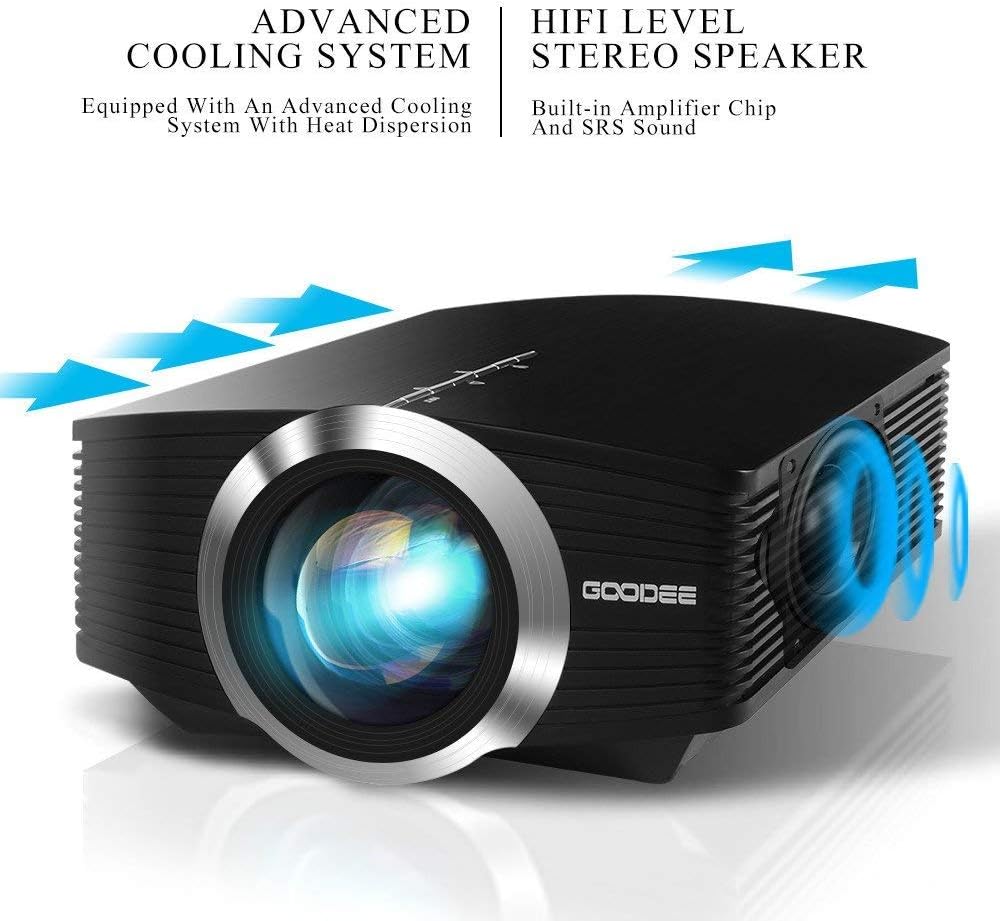
The GooDee GD-DE-9 is a portable LED projector designed for home entertainment, gaming, and presentations. It features a native resolution of 800x480p, supports up to 1080p input, and offers multiple connectivity options including HDMI, VGA, USB, AV, and SD card. Its advanced cooling system ensures quiet operation, and the integrated 2W speaker provides clear audio.

Joonis 1.1: Esiosa view of the GooDee Mini Projector GD-DE-9.
2. Ohutusalane teave
Tulekahju, elektrilöögi või vigastuste vältimiseks järgige järgmisi ohutusnõudeid:
- Ärge avage projektorit casing. Kõik hooldustööd suunake kvalifitseeritud hoolduspersonali poole.
- Tulekahju või elektrilöögi vältimiseks ärge jätke projektorit vihma või niiskuse kätte.
- Tagage piisav ventilatsioon. Ärge blokeerige ventilatsiooniavasid.
- Kasutage ainult projektoriga kaasasolevat toiteadapterit.
- Vältige otse projektori objektiivi vaatamist, kui lamp on sisse lülitatud.
- Asetage projektor stabiilsele tasasele pinnale.
- Äikese ajal või kui projektori pikka aega ei kasutata, eemaldage see vooluvõrgust.
3. Pakendi sisu
Palun kontrollige, kas kõik esemed on teie pakendis kaasas:
- GooDee Mini Projector GD-DE-9
- Toiteadapter
- Kaugjuhtimispult
- HDMI kaabel
- AV Cable
- Kasutusjuhend
4. Toote lõppview
4.1 Projektori komponendid

Joonis 4.1: Külg view sisend-/väljundportidega.
The projector features a direct light path optical technology for enhanced brightness and an advanced cooling system for quiet operation.

Figure 4.2: Advanced Cooling System and HIFI Stereo Speaker.
4.2 kaugjuhtimispult
The remote control allows you to operate the projector from a distance. Insert two AAA batteries (not included) into the remote control before use.

Joonis 4.3: Kaugjuhtimispult.
5. Seadistamine
5.1 Paigutus ja projektsioonikaugus
The image size is adjusted by changing the projection distance. For optimal viewing, a projection distance between 1.5 to 4 meters is recommended, yielding screen sizes from 50 to 130 inches. The best projection size is typically 80-100 inches at a distance of 6.6-8 feet.

Figure 5.1: Projection Distance and Screen Size Chart.
Joonis 5.2: näitample Projector Placement.
5.2 Toiteühendus
Ühendage toiteadapter projektori toitesisendi porti ja seejärel ühendage adapter pistikupessa.
5.3 Sisendseadmete ühendamine
The projector supports various input sources including HDMI, VGA, USB, AV, and SD card. It can connect to PCs, laptops, DVD players, PS3/4, Xbox ONE, and smartphones/tablets (via MHL cable and adapter, not included).

Figure 5.3: Multimedia Connection Diagram.
To connect a smartphone or tablet, ensure your device supports MHL functionality. You will need an MHL cable and a suitable adapter (not included).

Figure 5.4: Connecting Smartphones/Tablets.
5.4 Focus Adjustment and Keystone Correction
Adjust the focus ring on the projector lens until the image is clear. Use the keystone correction feature to adjust the image if it appears trapezoidal. The projector supports a ±15° keystone correction.
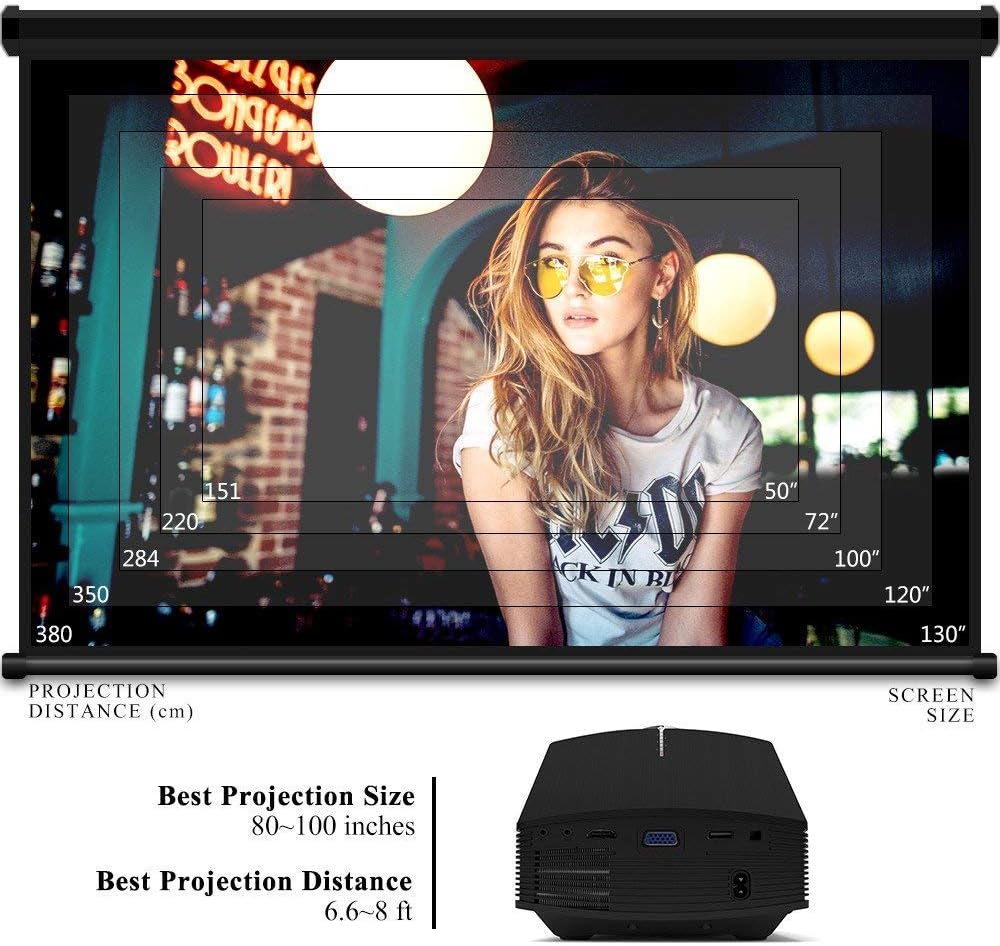
Figure 5.5: Focus and Keystone Adjustment.
6. Kasutusjuhised
6.1 Toide sisse/välja
Projektori sisse- või väljalülitamiseks vajutage projektori või kaugjuhtimispuldi toitenuppu.
6.2 Allika valik
Press the 'Source' button on the projector or remote control to cycle through available input sources (HDMI, VGA, USB, AV, SD). Select the desired input source corresponding to your connected device.
6.3 Menüüs navigeerimine
Use the arrow buttons on the projector or remote control to navigate through the on-screen menu. Press 'OK' or 'Enter' to confirm selections. Use the 'Menu' button to access settings and 'Exit' or 'Return' to go back.
6.4 Heliväljund
The projector has a built-in 2W speaker. For external audio, connect speakers or headphones to the 3.5mm audio output jack on the projector.
7. Hooldus
7.1 Objektiivi puhastamine
Use a soft, lint-free cloth or lens cleaning paper to gently wipe the projector lens. Do not use abrasive cleaners or solvents.
7.2 Õhuavade puhastamine
Regularly clean the air vents to ensure proper airflow and prevent overheating. Use a soft brush or compressed air to remove dust accumulation.
7.3 Säilitamine
When not in use, store the projector in a cool, dry place, away from direct sunlight and extreme temperatures. Use the original packaging or a protective case to prevent dust and damage.
8. Veaotsing
| Probleem | Võimalik põhjus | Lahendus |
|---|---|---|
| Ühtegi pilti ei kuvata | Valitud on vale sisendallikas; kaabel pole korralikult ühendatud; seade pole sisse lülitatud. | Select the correct input source; Check all cable connections; Ensure the source device is powered on. |
| Pilt on udune | Fookus pole reguleeritud; projektor on ekraanile liiga lähedal/kaugel. | Reguleeri teravustamisrõngast; Reguleeri projektsioonikaugust. |
| Pilt on trapetsikujuline | Projektor ei ole ekraaniga risti. | Reguleerige trapetsimoonutuse korrektsiooni. |
| Ei mingit heli | Volume too low; Muted; External audio device not connected/configured. | Increase volume; Unmute; Check external audio connections and settings. |
| Kaugjuhtimispult ei tööta | Patareid tühjenenud/patareide laetuse tase; takistus puldi ja projektori vahel; puldi andur blokeeritud. | Replace batteries; Remove obstructions; Ensure remote sensor is clear. |
9. Tehnilised andmed
| Funktsioon | Detail |
|---|---|
| Kaubamärk | GooDee |
| Mudeli number | GD-DE-9 |
| Kuva tüüp | LCD |
| Natiivne eraldusvõime | 800 x 480 pikslit |
| Toetatud eraldusvõime | Kuni 1080p |
| Heledus | 3000 luumenit (LED) |
| Lamp Elu | 30,000 tundi |
| Ühenduvustehnoloogia | HDMI, USB, VGA, AV, SD-kaart |
| Riistvara liides | HDMI, USB, VGA |
| Integreeritud kõlar | 2W Stereo Speaker |
| Projektsiooni kaugus | 1.5 - 4 meters (6.6 - 8 feet recommended) |
| Ekraani suurus | 50 - 130 inches (80 - 100 inches recommended) |
| Keystone korrigeerimine | ±15° Käsitsi |
| Vormitegur | Kaasaskantav |
| Paigaldustüüp | Lauaplaadi kinnitus |
| Värv | Must |
| Pakendi mõõtmed | 33 x 21.6 x 11.8 cm |
| Kauba kaal | 1.48 kg |
| Soovitatav kasutamine | Gaming, Home Theater |
| Ühilduvad seadmed | Smartphone, PC, Laptop, DVD Player, PS3/4, Xbox ONE, Fire TV Stick |
10. Garantii ja tugi
GooDee offers a 3-year warranty for this projector. If you encounter any issues or are not completely satisfied with your purchase, please contact GooDee customer support. A refund or replacement is available within the first 2 months of purchase. Customer satisfaction is our top priority.
For support, please refer to the contact information provided on the GooDee official websaidil või teie ostuplatvormil.