
Sissejuhatus
This manual provides essential instructions for setting up, operating, maintaining, and troubleshooting your Sony KDL-32W655A 32-inch Full HD Smart TV. Please read this manual thoroughly before using your television to ensure proper and safe operation. Keep this manual for future reference.

Figure 1: Sony KDL-32W655A Smart TV (Front View)
Ohutusteave
Always observe the following safety precautions when using your television:
- Ärge blokeerige ventilatsiooniavasid. Tagage teleri ümber piisavalt ruumi korraliku õhuvoolu tagamiseks.
- Ärge asetage telerit ebastabiilsele kärule, alusele, statiivile, kronsteinile ega lauale.
- Kaitske toitejuhet peale kõndimise või muljumise eest.
- Eemaldage teler vooluvõrgust äikese ajal või kui te seda pikka aega ei kasuta.
- Andke kõik hooldustööd kvalifitseeritud teeninduspersonalile.
Seadistamine
1. Lahtipakkimine
Eemaldage teler ja kõik lisatarvikud ettevaatlikult pakendist. Hoidke pakkematerjalid alles edaspidiseks transpordiks või hoolduseks.
2. Statiivi kokkupanek
Attach the desktop stand to the television. Ensure all screws are securely fastened. Refer to the diagram below for proper assembly.

Figure 2: TV with Desktop Stand Attached
Alternatively, the TV can be wall-mounted using a compatible VESA wall mount (sold separately). Consult a professional for wall-mounting installation.
3. Välisseadmete ühendamine
Ühendage välisseadmed teleri portidega. Enne ühenduste loomist veenduge, et teler on vooluvõrgust lahti ühendatud.
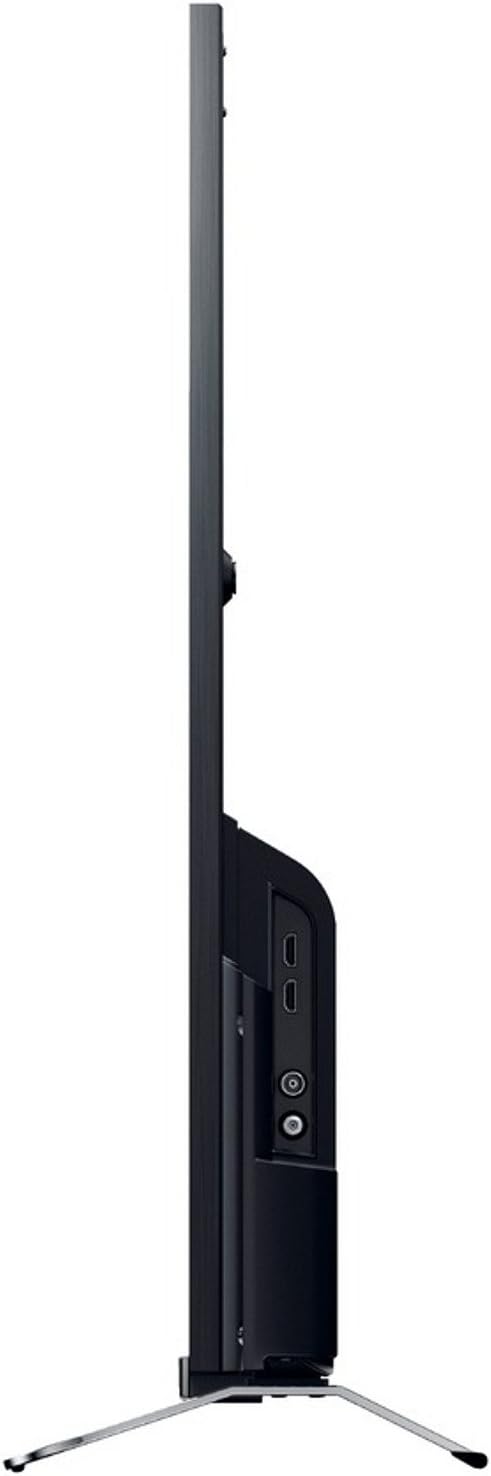
Joonis 3: Külg View ühendusportidega
- Võimsus: Connect the power cord to the AC inlet on the TV and then to a wall outlet.
- HDMI: Use an HDMI cable to connect devices like Blu-ray players, game consoles, or set-top boxes to the HDMI 1 or HDMI 2 sadamad.
- USB: Connect USB storage devices for media playback or DVR functionality to the USB 2.0 sadamasse.
- Ethernet (LAN): For a wired internet connection, connect an Ethernet cable to the LAN sadamasse.
- Antenn/kaabel: Connect your antenna or cable TV feed to the RF sisend.
- Component Video (YPbPr/YCbCr): Connect older video devices using component cables to the dedicated input.
- Komposiitvideo: Connect legacy video devices using a composite video cable to the dedicated input.
- Digitaalne heliväljund (optiline): For connecting to a soundbar or home theater system with an optical input.
- Kõrvaklapid: Privaatseks kuulamiseks ühendage kõrvaklapid.
4. Algseadistuse viisard
After connecting all cables, plug in the TV and press the power button on the remote control. The initial setup wizard will guide you through:
- Keele valik.
- Piirkonna/riigi valik.
- Channel scanning (for DVB-C, DVB-S, DVB-T).
- Network setup (Wi-Fi or wired Ethernet).
- Kellaaja ja kuupäeva seaded.
Kasutusjuhised
1. Kaugjuhtimispuldi funktsioonid
The included remote control allows you to access all TV functions. Insert the provided batteries into the remote control, observing polarity.
- Toitenupp: Lülitab teleri sisse või välja.
- Kanal üles/alla: Vahetab telekanaleid.
- Helitugevuse suurendamine/mahandamine: Reguleerib helitaset.
- Sisend/allikas: Valib sisendallika (HDMI, USB jne).
- Home/Smart TV: Avab nutiteleri liidese.
- Navigation Buttons (Arrows, Enter): Navigeerib menüüdes ja kinnitab valikuid.
- Tagasi/tagasi: Naaseb eelmisele ekraanile või menüüle.
- Valikud: Kuvab kontekstipõhised valikud.
2. Nutiteleri funktsioonid
Your Sony KDL-32W655A is equipped with Smart TV capabilities, allowing access to internet content and applications.
- Interneti-ühendus: Connect to your home network via Wi-Fi or Ethernet. Navigate to the Network Settings menu to configure.
- Interneti-TV: Access various online streaming services and content directly from your TV.
- Rakendused: The TV supports lifestyle applications such as Skype. An Opera browser is also available for web sirvimine.
- DLNA Certified: Stream media from compatible devices on your home network.
3. Media Playback and Recording
- USB-meedia taasesitus: Insert a USB storage device into the USB port. The TV will detect the device, allowing you to browse and play supported media files (JPG, MPO for images; 3GP, AVCHD, AVI, M-JPEG, MKV, MOV, MP4, MPEG1, MPEG2, TS, XVID for video).
- Digital Video Recorder (DVR): Record digital TV broadcasts to a connected USB hard drive. Consult the on-screen menu for DVR setup and scheduling.
4. Pildi ja heli seaded
Kohandage oma viewing and listening experience through the TV's settings menus.
- Pildirežiimid: Select from predefined picture modes such as Kino, Mäng, Foto, Sport, ja Elav to optimize display settings for different content types.
- Motionflow 200 Hz: This technology enhances motion clarity for fast-moving scenes.
- Helisätted: Adjust bass, treble, and other audio parameters using the 6-band equalizer. The TV features 2 built-in speakers with a total RMS power of 10W.
- Ekraanivorming: Adjust the aspect ratio (16:9, 14:9, Auto, Zoom) to fit your content.
5. Lisafunktsioonid
- Elektrooniline saatejuht (EPG): View upcoming TV programs and schedule recordings.
- Pilt pildis (PiP): Display two different sources simultaneously.
- Sleep Timer/On/Off Timer: Set the TV to automatically turn off or on at specified times.
Hooldus
1. Televiisori puhastamine
- Ekraan: Pühkige ekraani õrnalt pehme, ebemevaba lapiga. Kangekaelsete plekkide korral pühkigeampLoputage lappi veega või spetsiaalse ekraanipuhastusvahendiga. Ärge pihustage vedelikku otse ekraanile.
- Kabinet: Pühkige teleri korpust pehme ja kuiva lapiga. Vältige abrasiivsete puhastusvahendite või lahustite kasutamist.
- Ventilatsioon: Ensure the ventilation openings on the back of the TV remain clear of dust and obstructions.
2. Tarkvaravärskendused
Periodically check for software updates to ensure your TV has the latest features and performance improvements. Updates can usually be performed via the network connection in the TV's settings menu.
Veaotsing
Enne klienditoega ühenduse võtmist proovige levinud probleemide lahendamiseks järgmisi lahendusi.
| Probleem | Võimalik põhjus/lahendus |
|---|---|
| Jõudu pole |
|
| Pilti pole / must ekraan |
|
| Heli puudub |
|
| Ei saa WiFi-ga ühendust luua |
|
| Kaugjuhtimispult ei tööta |
|
If the problem persists after trying these steps, please contact Sony customer support.
Tehnilised andmed
| Funktsioon | Detail |
|---|---|
| Mudel | KDL-32W655A |
| Ekraani suurus | 32 tolli (81.3 cm) |
| Kuvamistehnoloogia | LED |
| Resolutsioon | Full HD (1920 x 1080 pikslit) |
| Liikumise parandamine | Motionflow 200 Hz |
| Kuvasuhe | 16:9 |
| Nutiteleri funktsioonid | Yes (Internet TV, Skype, Opera Browser, DLNA) |
| Wi-Fi | Jah |
| Ethernet (LAN) | 1 port |
| HDMI pordid | 2 |
| USB 2.0 pordid | 1 |
| SCART-pordid | 1 |
| Komponentvideo sisend | 1 |
| Komposiitvideo sisend | 1 |
| RF sisend | 1 |
| Digitaalne heliväljund (optiline) | 1 |
| Kõrvaklappide väljund | 1 |
| Tuneri tüüp | Analog & Digital (DVB-C, DVB-S, DVB-S2, DVB-T) |
| Kõlarid | 2 (sisseehitatud) |
| RMS nimivõimsus | 10 W |
| Energiatarve (töötav) | 41 W |
| Energiatarve (ooterežiim) | 0.45 W |
| Aastane energiatarbimine | 57 kWh |
| Energiatõhususe klass | A |
| Mõõdud (L x K x S) ilma aluseta | 725 mm x 438 mm x 69 mm |
| Kaal ilma aluseta | 6.8 kg |
| Kaal koos alusega | 7.8 kg |
| Värv | Must |
Märkus. Spetsifikatsioone võidakse ette teatamata muuta.
Garantii ja tugi
Your Sony KDL-32W655A television comes with a limited warranty. Please refer to the warranty card included in your product packaging for detailed terms and conditions, including the warranty period and coverage.
For technical assistance, product registration, or to find authorized service centers, please visit the official Sony support webveebisaidilt või võtke ühendust oma piirkonna Sony klienditeenindusega. Toega ühenduse võtmisel hoidke ostutšekk ja toote seerianumber käepärast.
Veebitugi: https://www.sony.com/electronics/support


